<?xml version="1.0" encoding="utf-8"?><feed xmlns="http://www.w3.org/2005/Atom" ><generator uri="https://jekyllrb.com/" version="3.10.0">Jekyll</generator><link href="https://iamprasadraju.github.io/blog/feed.xml" rel="self" type="application/atom+xml" /><link href="https://iamprasadraju.github.io/blog/" rel="alternate" type="text/html" /><updated>2025-10-04T11:21:35+00:00</updated><id>https://iamprasadraju.github.io/blog/feed.xml</id><title type="html">Prasad Writes</title><subtitle></subtitle><entry><title type="html">Regex</title><link href="https://iamprasadraju.github.io/blog/2025/09/30/Regex.html" rel="alternate" type="text/html" title="Regex" /><published>2025-09-30T00:00:00+00:00</published><updated>2025-09-30T00:00:00+00:00</updated><id>https://iamprasadraju.github.io/blog/2025/09/30/Regex</id><content type="html" xml:base="https://iamprasadraju.github.io/blog/2025/09/30/Regex.html"><![CDATA[<style>
  #h1{
    background-color: yellow;
    font-size: 25px;
    font-weight: bold;
  }


</style>

<p><span id="h1"> Regex </span></p>]]></content><author><name></name></author><summary type="html"><![CDATA[]]></summary></entry><entry><title type="html">Matrix Multiplication</title><link href="https://iamprasadraju.github.io/blog/2025/09/27/Matrix-Multiplication.html" rel="alternate" type="text/html" title="Matrix Multiplication" /><published>2025-09-27T00:00:00+00:00</published><updated>2025-09-27T00:00:00+00:00</updated><id>https://iamprasadraju.github.io/blog/2025/09/27/Matrix-Multiplication</id><content type="html" xml:base="https://iamprasadraju.github.io/blog/2025/09/27/Matrix-Multiplication.html"><![CDATA[<!--
<style>
    #h1{
        display: block;
        background-color: yellow;
        font-size: 30px;
        font-weight: bold;
        text-align: center;
    }
    .h3{
        font-weight: bold;
        font-size: 15px;
        background-color : lightgreen;
    }
    #h3{
        font-weight: bold;
        font-size: 15px;
    }
    img{
        display: block;
        width: 85%;
        margin-left: auto;
        margin-right: auto;

    }
    a{
        color: blue;
    }
    .grn-p{
        background-color: lightgreen;
        text-decoration: underline;
    }
    .red-h3{
        color: red;
        font-weight: bold;
    }
</style>
-->

<hr />

<p><img src="https://miro.medium.com/1*HjcZkViYtPKg-Wm2o7DFDg.png" /></p>

<p><strong>Matrix multiplication</strong> is a <a href="https://en.wikipedia.org/wiki/Binary_operation">binary operation</a> that produces a matrix from two matrices.</p>

<p>For matrix multiplication, the number of columns in the first matrix must be equal to the number of rows in the second matrix. The resulting matrix, known as the matrix product.</p>

<p>It has the number of rows of the first and the number of columns of the seconds matrix. The product of matrices <strong>A</strong> and <strong>B</strong> is denoted as <strong>AB</strong></p>

<p>Example:</p>

<ul>
  <li><code class="language-plaintext highlighter-rouge">A</code> of size(2, 3)</li>
  <li><code class="language-plaintext highlighter-rouge">B</code> of size(3, 2)</li>
  <li>Then A@B gives <code class="language-plaintext highlighter-rouge">AB</code> of size(2, 2) <strong>@</strong> - matmul
<br /></li>
</ul>

<p><strong><u>COMPUTATIONAL COMPLEXITY OF MATRIX MULTIPLICATION</u></strong></p>

<h3 id="1-gemm--general-matrix-multiplication">1. GEMM – General Matrix Multiplication</h3>

<p><strong>GEMM (General Matrix Multiplication)</strong> using a regular iterative algorithm, as commonly found in textbooks. This implementation follows the standard triple-nested loop approach for multiplying two matrices.</p>

<p><img src="https://upload.wikimedia.org/wikipedia/commons/thumb/e/eb/Matrix_multiplication_diagram_2.svg/500px-Matrix_multiplication_diagram_2.svg.png" alt="img" /></p>

<h3 id="algorithm-overview">Algorithm Overview</h3>

<p>The basic iterative algorithm for matrix multiplication computes the result of:</p>

<p>[
C = A x B
]</p>

<p><strong>Time Complexity</strong></p>

<p>The matrix multiplication algorithm that results from the definition requires, in the worst case, n<sup>3</sup> operations.</p>

<p><strong>why it’s O(n<sup>3</sup>)</strong> ?</p>

<p>For example,Take square matrices of size <code class="language-plaintext highlighter-rouge">N</code></p>

<p>Operations per element:</p>

<ul>
  <li>
    <p>Multiplication: n</p>
  </li>
  <li>
    <p>Additions: n - 1</p>
  </li>
</ul>

<p>Total operations per element: n + (n-1) = 2n+1</p>

<p>Total elements = n x n = n<sup>2</sup></p>

<p>so, Total flops = n<sup>2</sup> * (2n - 1) = 2n<sup>3</sup></p>

<p>However, in time complexity analysis using Big O notation, constant factors like 2 are omitted, So both 2n<sup>3</sup> and n<sup>3</sup> are simply written as O(n<sup>3</sup>).</p>

<ul>
  <li>Using this calculation we can get flops accurately. Ex: N = 1024 ; 2 * 1024 ^ 3 = 2147483648 ~ 2.15 GFLOPs</li>
</ul>

<p><code class="language-plaintext highlighter-rouge">note:</code> <strong>Flops</strong> - Floating point operations, <strong>Flop/s</strong> - Floating point operations per second</p>

<div class="language-bash highlighter-rouge"><div class="highlight"><pre class="highlight"><code>Input: matrices A <span class="o">(</span>n × m<span class="o">)</span> and B <span class="o">(</span>m × p<span class="o">)</span>
Output: matrix C <span class="o">(</span>n × p<span class="o">)</span><span class="sb">`</span>

Let C be a new matrix of size n × p

For i from 1 to n:
    For j from 1 to p:
        <span class="nb">sum</span> ← 0
        For k from 1 to m:
            <span class="nb">sum</span> ← <span class="nb">sum</span> + A[i][k] × B[k][j]
        C[i][j] ← <span class="nb">sum

</span>Return C
</code></pre></div></div>
<p>check the python implementation of matmul <a href="https://github.com/iamprasadraju/tinyML/blob/main/ops/gemm.py">gemm.py</a></p>

<p>But this algorithm is very slow (it like brute force algorithm for GEMM)</p>

<p>Reasons for why it’s slow:</p>
<ul>
  <li>single threaded execution</li>
  <li>Loading in main memory (RAM) instead of cache</li>
  <li>Poor memory access</li>
  <li>No Vectorization (AVX, SIMD) …</li>
</ul>

<p>Numpy optimized for all theses things. so it is much faster ….</p>

<p><strong><u>BENCHMARKING MY MAC (FLOP/s)</u></strong></p>

<p>Benchmarking on Mac M2 using numpy</p>

<p><img style="width: 40%" src="https://upload.wikimedia.org/wikipedia/commons/thumb/4/46/Macbook_Air_15_inch_-_2_%28blurred%29.jpg/1920px-Macbook_Air_15_inch_-_2_%28blurred%29.jpg" /></p>

<p>Let take square matrix of size N = 1024</p>

<ul>
  <li>
    <p>Total number of flops = 2N^3 = 2 * 1024 ** 3 = 2147483648 flops</p>
  </li>
  <li>
    <p>Total Memory to store (single precision) = 32 * 1024 * 1024 = 33554432 bytes = 32 MB</p>
  </li>
  <li>
    <p>Total time it takes compute A @ B (N = 1024) = t = 0.001682666999840876 sec</p>
  </li>
  <li>
    <p>So flop/s = flops / t = 2147483648 / 0.001682666999840876 * 1e-9 (GFLOP/s) = 1276 GFLOP/s (which is closed to therotical flop/s can get from m2 chip)</p>
  </li>
</ul>

<p>if it is double precision (float64) it is much slower ~ 1/2 to 1/4 slower than fp32</p>

<p>Benchmark your system using <a href="https://github.com/iamprasadraju/tinyML/blob/main/perf/perf_matmul_np.py">perf_gemm_np.py</a></p>

<hr />]]></content><author><name></name></author><summary type="html"><![CDATA[&lt;!–]]></summary></entry><entry><title type="html">Mathematical Proofs</title><link href="https://iamprasadraju.github.io/blog/2025/09/04/Mathematical-Proofs.html" rel="alternate" type="text/html" title="Mathematical Proofs" /><published>2025-09-04T00:00:00+00:00</published><updated>2025-09-04T00:00:00+00:00</updated><id>https://iamprasadraju.github.io/blog/2025/09/04/Mathematical-Proofs</id><content type="html" xml:base="https://iamprasadraju.github.io/blog/2025/09/04/Mathematical-Proofs.html"><![CDATA[<p>I need Proofs Bro 😎.</p>

<h2 id="why-sum-of-n-natural-numbers-is-nn12-">Why sum of N natural numbers is n(n+1)/2 ?</h2>]]></content><author><name></name></author><summary type="html"><![CDATA[I need Proofs Bro 😎.]]></summary></entry><entry><title type="html">Master Machine Learning</title><link href="https://iamprasadraju.github.io/blog/2025/09/03/Master-Machine-Learning.html" rel="alternate" type="text/html" title="Master Machine Learning" /><published>2025-09-03T00:00:00+00:00</published><updated>2025-09-03T00:00:00+00:00</updated><id>https://iamprasadraju.github.io/blog/2025/09/03/Master-Machine-Learning</id><content type="html" xml:base="https://iamprasadraju.github.io/blog/2025/09/03/Master-Machine-Learning.html"><![CDATA[<h1 id="master-machine-learning">Master Machine Learning</h1>
<hr />

<ol>
  <li>
    <p><strong>Python</strong> - <a href="https://youtube.com/playlist?list=PLhQjrBD2T3817j24-GogXmWqO5Q5vYy0V&amp;si=ne1MOMFWwjuLURWP">https://youtube.com/playlist?list=PLhQjrBD2T3817j24-GogXmWqO5Q5vYy0V&amp;si=ne1MOMFWwjuLURWP</a></p>
  </li>
  <li><strong>Learn Mathematics</strong> - <a href="https://www.coursera.org/specializations/mathematics-for-machine-learning-and-data-science">https://www.coursera.org/specializations/mathematics-for-machine-learning-and-data-science</a>
<span style="color: red">
</span>    <ol>
      <li>Linear Algebra</li>
      <li>Calculas</li>
      <li>Probability and Statistics
&lt;/span&gt;</li>
    </ol>
  </li>
  <li>
    <p><strong>Libraries used Machine Learning</strong></p>

    <ol>
      <li>
        <p>Numpy - <a href="https://numpy.org/doc/stable/user/absolute_beginners.html">Documentation</a> <strong>,</strong> <a href="https://youtu.be/ZB7BZMhfPgk?si=vWzSrVaIVi960BGP">Tutorial</a></p>
      </li>
      <li>
        <p>Pandas - <a href="https://pandas.pydata.org/docs/getting_started/index.html">Documentation</a> <strong>,</strong> <a href="https://youtube.com/playlist?list=PL-osiE80TeTsWmV9i9c58mdDCSskIFdDS&amp;si=22cuVJWoHA_XB9BJ">Tutorial</a></p>
      </li>
      <li>
        <p>Matplotlib - <a href="https://matplotlib.org/stable/users/getting_started/index.html">Documentation</a> <strong>,</strong> <a href="https://youtube.com/playlist?list=PL-osiE80TeTvipOqomVEeZ1HRrcEvtZB_&amp;si=p9ADIZiMn3SAgNir">Tutorial</a></p>
      </li>
      <li>
        <p>scikit-learn (Most used Library for Machine Learning)</p>
      </li>
    </ol>
  </li>
  <li>
    <p><strong>Machine Learning Algorithms</strong> - <a href="https://www.coursera.org/specializations/machine-learning-introduction">https://www.coursera.org/specializations/machine-learning-introduction</a></p>
  </li>
  <li>
    <p><strong>Build Projects</strong></p>

    <p><strong>WorkFlow</strong></p>

    <ul>
      <li>Collect Data / Use existing Datasets</li>
      <li>Clean Data (EDA)</li>
      <li>Training a Model</li>
      <li>Deploy to Production</li>
    </ul>
  </li>
</ol>]]></content><author><name></name></author><summary type="html"><![CDATA[Master Machine Learning]]></summary></entry><entry><title type="html">Good Reads</title><link href="https://iamprasadraju.github.io/blog/2025/08/30/Good-reads.html" rel="alternate" type="text/html" title="Good Reads" /><published>2025-08-30T00:00:00+00:00</published><updated>2025-08-30T00:00:00+00:00</updated><id>https://iamprasadraju.github.io/blog/2025/08/30/Good-reads</id><content type="html" xml:base="https://iamprasadraju.github.io/blog/2025/08/30/Good-reads.html"><![CDATA[<style>
	a {
	    color: blue
	        
	   }

	 a:hover{
	 	color: red;
	 	background-color: white
	 }
</style>

<ol>
  <li><a href="https://hermiene.net/essays-trans/relativity_of_wrong.html">[The Relativity of Wrong]</a> by Isaac Asimov (<span style="background-color: lightgreen">An essay that explores the idea that right and wrong are not absolute</span>)</li>
</ol>]]></content><author><name></name></author><summary type="html"><![CDATA[]]></summary></entry><entry><title type="html">White Papers</title><link href="https://iamprasadraju.github.io/blog/2025/08/30/White-Papers.html" rel="alternate" type="text/html" title="White Papers" /><published>2025-08-30T00:00:00+00:00</published><updated>2025-08-30T00:00:00+00:00</updated><id>https://iamprasadraju.github.io/blog/2025/08/30/White-Papers</id><content type="html" xml:base="https://iamprasadraju.github.io/blog/2025/08/30/White-Papers.html"><![CDATA[<style>
	.head{
		font-size: 25px;
		color: grey;
		font-weight: bold
	}
	a {
	    color: blue
	        
	   }

	 a:hover{
	 	color: red;
	 	background-color: white
	 }
	 .des{
	 	background-color: lightgray
	 }
</style>

<p><span class="head">DEEP LEARNING</span></p>

<hr />

<ol>
  <li>
    <p><a href="https://arxiv.org/pdf/1706.03762">[Attention Is All You Need]</a> (Transformers) - <span class="des">a neural network architecture that uses only attention mechanisms—abandoning recurrence and convolution—to enable fast, parallel, and state-of-the-art performance in tasks like machine translation and language modeling. This paper revolutionized AI by enabling models to efficiently capture relationships between all sequence elements, forming the backbone of today’s generative language models</span></p>
  </li>
  <li>
    <p><a href="https://proceedings.neurips.cc/paper_files/paper/2012/file/c399862d3b9d6b76c8436e924a68c45b-Paper.pdf">[ImageNet Classification with Deep Convolutional Neural Networks]</a> (Alexnet) - <span class="des">AlexNet is a deep convolutional neural network introduced in 2012 that won the ImageNet competition by using innovations like ReLU activation for faster training, dropout for reducing overfitting, overlapping pooling, and GPU parallelism. It drastically improved image recognition accuracy and sparked the deep learning revolution in computer vision.</span></p>
  </li>
</ol>

<p><span class="head">MACHINE LEARNING</span></p>

<hr />]]></content><author><name></name></author><summary type="html"><![CDATA[]]></summary></entry><entry><title type="html">Git Cheatsheet!</title><link href="https://iamprasadraju.github.io/blog/2025/08/21/Git-Cheatsheet.html" rel="alternate" type="text/html" title="Git Cheatsheet!" /><published>2025-08-21T00:00:00+00:00</published><updated>2025-08-21T00:00:00+00:00</updated><id>https://iamprasadraju.github.io/blog/2025/08/21/Git-Cheatsheet</id><content type="html" xml:base="https://iamprasadraju.github.io/blog/2025/08/21/Git-Cheatsheet.html"><![CDATA[<style>
        img{
            display: block;
            max-width: 800px;
            width: 100%;
            height: auto;
            margin: 0 auto;
        }
        a {
            color: blue
        }
        .cmd{
            background-color: lightgreen;

        }
        .head{
            color: red;
            font-weight: bold;
        }
        a:hover{
            color: red;
            background-color: white
        }
    </style>

<p><span class="head">01 GIT CONFIGURATION</span> (Configuring user information used across all local repositories)</p>

<hr />

<p>⇢ <span class="cmd"> <code class="language-plaintext highlighter-rouge">git config --global user.name “Your Name”</code></span> - Set the name that will be attached to your commits and tags.</p>

<p>⇢ <span class="cmd"> <code class="language-plaintext highlighter-rouge">git config --global user.email “you@example.com”</code></span> - Set the e-mail address that will be attached to your commits
and tags.</p>

<p>⇢ <span class="cmd"> <code class="language-plaintext highlighter-rouge">git config --global color.ui auto</code></span> - Enable some colorization of Git output.</p>

<p><br /></p>

<p><span class="head">02 SETUP</span> (Working with snapshots and the Git staging area)</p>

<hr />

<p>⇢ <span class="cmd">git init [project name]</span> - Create a new local repository in the current directory. If [project name] is provided, Git will create a new directory named [project name] and will initialize a repository inside it.</p>

<p>⇢ <span class="cmd">git clone &lt;project url&gt;</span> - Downloads a project with the entire history from the remote repository.</p>

<p>⇢ <span class="cmd">git status</span> - show modified files in working directory, staged for your next commit.</p>

<p>⇢ <span class="cmd">git add [file]</span> - add a file as it looks now to your next commit (stage).</p>

<p>⇢ <span class="cmd">git reset</span> - unstage a file while retaining the changes in working directory.</p>

<p>⇢ <span class="cmd">git diff</span> - diff of what is changed but not staged.</p>

<p>⇢ <span class="cmd"><code class="language-plaintext highlighter-rouge">git diff --staged</code></span> - diff of what is staged but not yet committed</p>

<p>⇢ <span class="cmd"><code class="language-plaintext highlighter-rouge">git commit -m "[descriptive message]"</code></span> - commit your staged content as a new commit snapshot.</p>

<p><br /></p>

<p><span class="head">03 BRANCH &amp; MERGE</span> (Working with snapshots and the Git staging area.)</p>

<hr />

<p>⇢ <span class="cmd">git branch</span> - list your branches. a * will appear next to the currently active branch.</p>

<p>⇢ <span class="cmd">git branch [branch-name] </span> - create a new branch at the current commit.</p>

<p>⇢ <span class="cmd">git checkout</span> - switch to another branch and check it out into your working directory.</p>

<p>⇢ <span class="cmd">git merge [branch]</span> - merge the specified branch’s history into the current one.</p>

<p>⇢ <span class="cmd">git log</span> - show all commits in the current branch’s history.</p>]]></content><author><name></name></author><summary type="html"><![CDATA[]]></summary></entry><entry><title type="html">Working With ESP32.</title><link href="https://iamprasadraju.github.io/blog/2025/08/21/Working-with-ESP32.html" rel="alternate" type="text/html" title="Working With ESP32." /><published>2025-08-21T00:00:00+00:00</published><updated>2025-08-21T00:00:00+00:00</updated><id>https://iamprasadraju.github.io/blog/2025/08/21/Working-with-ESP32</id><content type="html" xml:base="https://iamprasadraju.github.io/blog/2025/08/21/Working-with-ESP32.html"><![CDATA[<style>
        img{
            display: block;
            max-width: 800px;
            width: 100%;
            height: auto;
            margin: 0 auto;
        }
        a {
            color: blue
        }
        #python{
            display: block;
            max-width: 800px;
            width: 15%;
            height: auto;
            margin: 25px;
        }
        .sub-headers{
            background-color: yellow;
            font-weight: bold

        }
        a:hover{
            color: red;
            background-color: white
            }
    </style>

<p><span style="font-weight: bold; font-size: 40px; background-color:red">ESP32</span></p>

<hr />

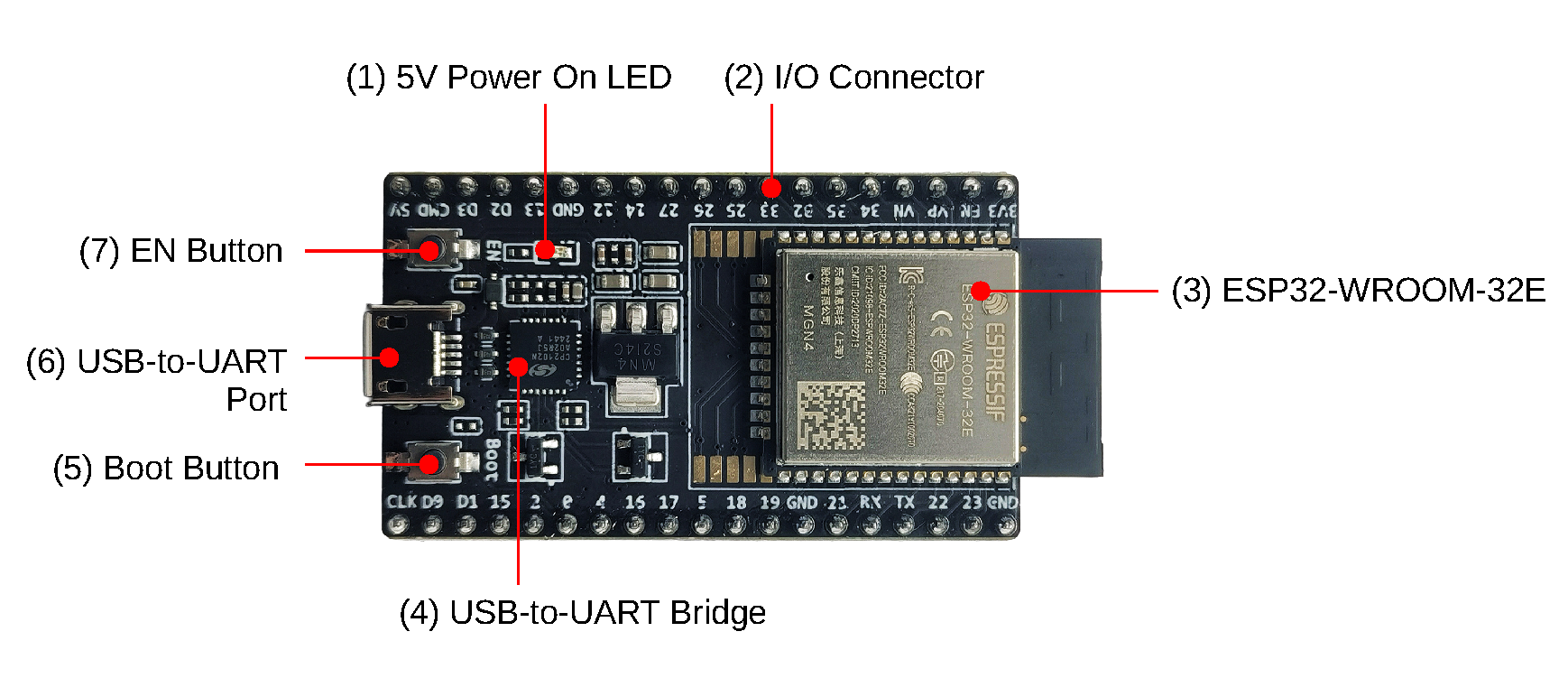
<p><span style="font-weight: bold; color: red">ESP32</span> is a family of low-cost, energy-efficient microcontrollers that integrate both Wi-Fi and Bluetooth capabilities. These chips feature a variety of processing options, including the Tensilica Xtensa LX6 microprocessor available in both dual-core and single-core variants, the Xtensa LX7 dual-core processor, or a single-core RISC-V microprocessor. In addition, the ESP32 incorporates components essential for wireless data communication such as built-in antenna switches, an RF balun, power amplifiers, low-noise receivers, filters, and power-management modules.</p>

<p><img src="https://docs.espressif.com/projects/esp-dev-kits/en/latest/esp32/_images/esp32-devkitc-v4-functional-overview.png" /></p>

<p><strong>SPECS :</strong></p>

<ol>
  <li>
    <p><strong>Processor</strong>: CPU: <span style="color: firebrick">Xtensa dual-core (or single-core)32-bit LX6, Operating on 160 - 240 MHz </span></p>
  </li>
  <li>
    <p><strong>Memory</strong>: <span style="color: firebrick">520kb RAM, 448kb ROM</span></p>
  </li>
  <li>
    <p><strong>Wireless connectivity</strong>: <span style="color: firebrick"> Wi-Fi: 802.11 b/g/n <strong>,</strong> Bluetooth: v4.2 BR/EDR and BLE (shares the radio with Wi-Fi)</span></p>
  </li>
</ol>

<p><span style="color: green; font-weight:bold; text-decoration: underline;">Softwares and Tools: </span></p>

<p><span class="sub-headers">EUSB-to-UART Drivers:</span> To Establish Serial Connection with ESP32➡️<a style="font-weight: bold" href="https://www.silabs.com/software-and-tools/usb-to-uart-bridge-vcp-drivers">Download Drivers</a></p>

<p><span class="sub-headers">ESP-IDF(SDK)</span>: For C/C++ builds. (Low-levl code —–&gt; ESP-IDF —–&gt; Machine Code). It comes with cross-compiler toolchain, Debugger, Linker etc.</p>

<p>➡️ <a href="https://github.com/espressif/esp-idf"><strong>Github</strong></a><strong>,</strong>  <a href="https://docs.espressif.com/projects/esp-idf/en/stable/esp32/get-started/index.html"><strong>Get Started (ESP-IDF)</strong></a></p>

<p><span class="sub-headers">esptool</span> : <span style="color: rebeccapurple">A Python-based, open-source, platform-independent serial utility for flashing, provisioning, and interacting with Espressif SoCs.</span> <a href="https://docs.espressif.com/projects/esptool/en/latest/esp32/esptool/index.html"><strong>Documentation</strong></a></p>

<p><u style="background-color: lightgreen">Installation</u> -</p>
<div class="language-plaintext highlighter-rouge"><div class="highlight"><pre class="highlight"><code>    pip install esptool

</code></pre></div></div>
<p>Useful commands are: <code class="language-plaintext highlighter-rouge">esptool erase_flash</code> -&gt; Erase all flash memory</p>

<hr />
<p><br /></p>

<p><u style="background-color: lightgreen; font-size: 20px; font-weight: bold">MICRO-PYTHON</u></p>

<p><img id="python" src="https://upload.wikimedia.org/wikipedia/commons/thumb/a/a7/MicroPython_new_logo.svg/800px-MicroPython_new_logo.svg.png" /></p>

<p><strong>MicroPython</strong> is a software implementation of a programming language largely compatible with Python 3, written in C, that is optimized to run on a microcontroller.</p>

<p>MicroPython consists of a Python compiler to bytecode and a runtime interpreter of that bytecode. The user is presented with an interactive prompt (the REPL) to execute supported commands immediately. Included are a selection of core Python libraries; MicroPython includes modules which give the programmer access to low-level hardware.</p>

<p>MicroPython does have an inline assembler, which lets the code run at full speed, but it is not portable across different microcontrollers.</p>

<p><a href="https://micropython.org/download/" target="_blank">Download MicroPython Firmware</a></p>

<p><span style="background-color: lightcoral">Flashing MicroPython Firmware</span> <strong>-</strong> <span style="border: 1px solid #ccc;">esptool.py –baud 460800 write_flash 0x1000 ESP32_BOARD_NAME-DATE-VERSION.bin</span></p>

<p><strong>Install Firmware – USE REPL (to interact and run micropyhton) – Build Projects</strong></p>

<p>➡️<a href="https://docs.micropython.org/en/latest/index.html"><strong>MicroPython Docs</strong></a></p>

<p><span style="background-color: lightgreen; text-decoration: underline">Softwares and Tools:</span></p>

<p><span class="sub-headers">mpremote</span> - The mpremote command line tool provides an integrated set of utilities to remotely interact with, manage the filesystem on, and automate a MicroPython device over a serial connection.</p>

<ol>
  <li>
    <p><strong>connect</strong> - connect to specified device via name: $ <span style="background-color:lightsteelblue">mpremote connect &lt;device&gt; </span></p>
  </li>
  <li>
    <p><strong>repl</strong> - enter the REPL on the connected device: $ <span style="background-color:lightsteelblue">mpremote repl [–options] </span></p>
  </li>
</ol>

<p>For more commands visit <a href="https://docs.micropython.org/en/latest/reference/mpremote.html" target="_blank">Manual</a></p>

<p><span class="sub-headers">WebREPL</span> -</p>

<p>WebREPL allows you to use the Python prompt over WiFi, connecting through a browser. The latest versions of Firefox and Chrome are supported.</p>

<ol>
  <li>
    <p>Single connection/channel, multiplexing terminal access, filesystem access, and board control.</p>
  </li>
  <li>
    <p>Network ready and Web technologies ready (allowing access directly from a browser with an HTML-based client).</p>
  </li>
</ol>

<p><strong>setup</strong> - 1. Install MicroPyhton Firmware
        2. Connect device and PC to same Wifi network
        3. Enter REPL mode
        4. Run - <strong>import webrepl_setup</strong>
        5. enable WebREPL mode, 
        it show WebREPL server started on <span style="background-color: red">http://192.168.31.169:8266/</span>
<img src="https://i0.wp.com/blog.oshpark.com/wp-content/uploads/2018/10/webrepl-browser.png?w=656&amp;h=516&amp;ssl=1" /><br /></p>

<p>ESP32 datasheet - <a href="https://www.espressif.com/sites/default/files/documentation/esp32_datasheet_en.pdf">https://www.espressif.com/sites/default/files/documentation/esp32_datasheet_en.pdf</a></p>

<p>More to write …</p>

<p>last updated on: 12/09/2025</p>]]></content><author><name></name></author><summary type="html"><![CDATA[]]></summary></entry><entry><title type="html">Datastructures &amp;amp; Algorithms</title><link href="https://iamprasadraju.github.io/blog/2025/08/21/Datastructures-and-Algorithms.html" rel="alternate" type="text/html" title="Datastructures &amp;amp; Algorithms" /><published>2025-08-21T00:00:00+00:00</published><updated>2025-08-21T00:00:00+00:00</updated><id>https://iamprasadraju.github.io/blog/2025/08/21/Datastructures-and-Algorithms</id><content type="html" xml:base="https://iamprasadraju.github.io/blog/2025/08/21/Datastructures-and-Algorithms.html"><![CDATA[<p>Coming soon !!</p>]]></content><author><name></name></author><summary type="html"><![CDATA[Coming soon !!]]></summary></entry><entry><title type="html">Mathematics for Machine Learning</title><link href="https://iamprasadraju.github.io/blog/2025/08/21/Mathematics-for-Machine-Learning.html" rel="alternate" type="text/html" title="Mathematics for Machine Learning" /><published>2025-08-21T00:00:00+00:00</published><updated>2025-08-21T00:00:00+00:00</updated><id>https://iamprasadraju.github.io/blog/2025/08/21/Mathematics-for-Machine-Learning</id><content type="html" xml:base="https://iamprasadraju.github.io/blog/2025/08/21/Mathematics-for-Machine-Learning.html"><![CDATA[<p>updating …..</p>]]></content><author><name></name></author><summary type="html"><![CDATA[updating …..]]></summary></entry></feed>