Working With ESP32
ESP32 is a family of low-cost, energy-efficient microcontrollers that integrate both Wi-Fi and Bluetooth capabilities. These chips feature a variety of processing options, including the Tensilica Xtensa LX6 microprocessor available in both dual-core and single-core variants, the Xtensa LX7 dual-core processor, or a single-core RISC-V microprocessor. In addition, the ESP32 incorporates components essential for wireless data communication such as built-in antenna switches, an RF balun, power amplifiers, low-noise receivers, filters, and power-management modules.
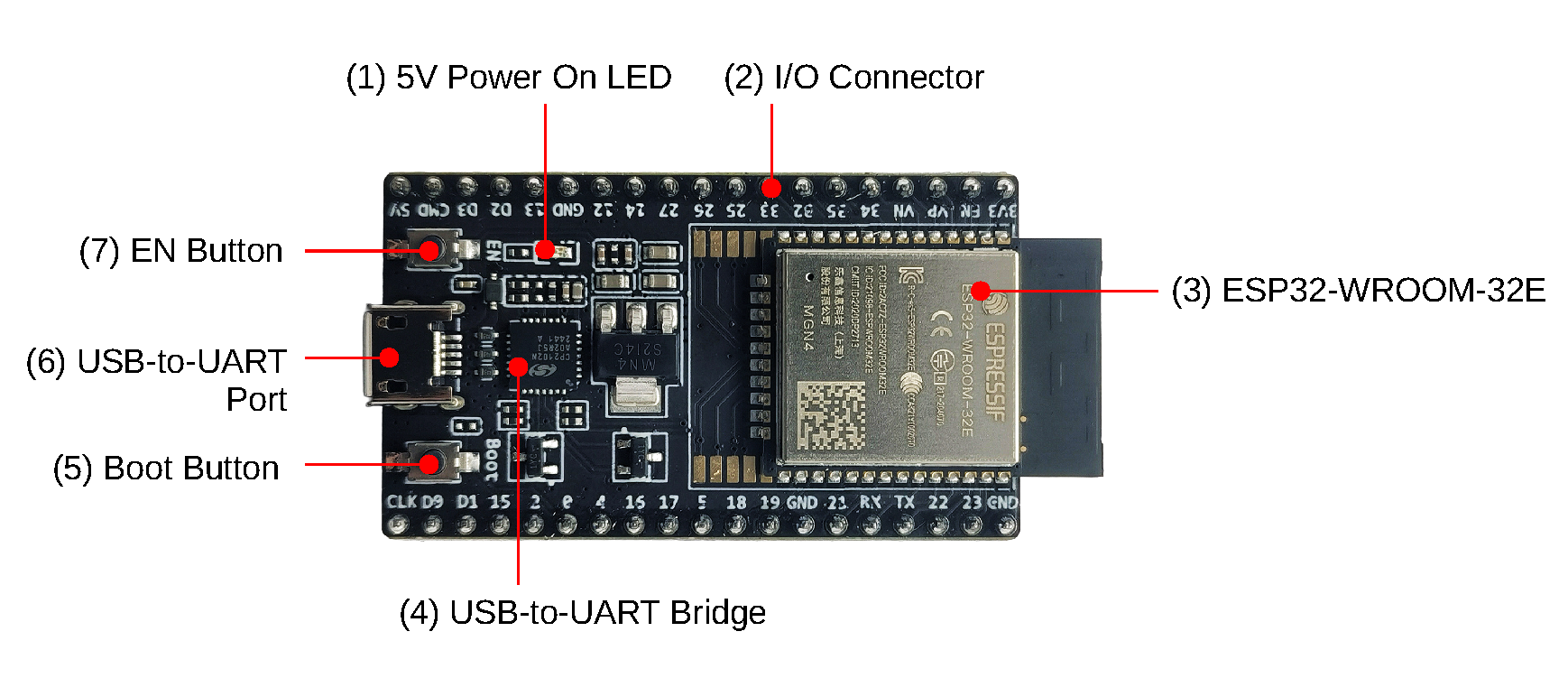
What are the ESP32 Hardware Specifications?
- Processor: CPU: Xtensa dual-core (or single-core) 32-bit LX6, Operating on 160 - 240 MHz
- Memory: 520kb RAM, 448kb ROM
- Wireless connectivity: Wi-Fi: 802.11 b/g/n, Bluetooth: v4.2 BR/EDR and BLE (shares the radio with Wi-Fi)
Which Softwares and Tools are Used for ESP32?
USB-to-UART Drivers: To Establish Serial Connection with ESP32 ➡️ Download Drivers
ESP-IDF (SDK): For C/C++ builds. (Low-level code —–> ESP-IDF —–> Machine Code). It comes with cross-compiler toolchain, Debugger, Linker etc. ➡️ Github, Get Started (ESP-IDF)
esptool : A Python-based, open-source, platform-independent serial utility for flashing, provisioning, and interacting with Espressif SoCs. Documentation
Installation -
1
pip install esptool
Useful commands are: esptool erase_flash -> Erase all flash memory
How to Use MicroPython with ESP32?

MicroPython is a software implementation of a programming language largely compatible with Python 3, written in C, that is optimized to run on a microcontroller.
MicroPython consists of a Python compiler to bytecode and a runtime interpreter of that bytecode. The user is presented with an interactive prompt (the REPL) to execute supported commands immediately. Included are a selection of core Python libraries; MicroPython includes modules which give the programmer access to low-level hardware.
MicroPython does have an inline assembler, which lets the code run at full speed, but it is not portable across different microcontrollers.
Flashing MicroPython Firmware - esptool.py --baud 460800 write_flash 0x1000 ESP32_BOARD_NAME-DATE-VERSION.bin
Install Firmware – USE REPL (to interact and run micropython) – Build Projects
What Tools are Available for MicroPython?
mpremote - The mpremote command line tool provides an integrated set of utilities to remotely interact with, manage the filesystem on, and automate a MicroPython device over a serial connection.
- connect - connect to specified device via name:
$ mpremote connect <device> - repl - enter the REPL on the connected device:
$ mpremote repl [--options]
For more commands visit Manual
WebREPL - WebREPL allows you to use the Python prompt over WiFi, connecting through a browser. The latest versions of Firefox and Chrome are supported.
- Single connection/channel, multiplexing terminal access, filesystem access, and board control.
- Network ready and Web technologies ready (allowing access directly from a browser with an HTML-based client).
Setup -
- Install MicroPython Firmware
- Connect device and PC to same Wifi network
- Enter REPL mode
- Run -
import webrepl_setup - Enable WebREPL mode, it will show WebREPL server started on
http://192.168.31.169:8266/

ESP32 datasheet - https://www.espressif.com/sites/default/files/documentation/esp32_datasheet_en.pdf
How to Setup C++ Development for ESP32?
-
Install Python (for more check
https://docs.espressif.com/projects/esp-idf/en/stable/esp32/get-started/linux-macos-setup.html#get-started-prerequisites) -
Install ESP-IDF on your system. Github :
https://github.com/espressif/esp-idfor Download latest esp-idf zip.
1
cd esp-idf
- Run
./install.sh all. After successful installation: Issue you might encounter - doesn’t trust the SSL certificate authority chain when trying to download toolchains for ESP-IDF.
To fix this run these commands:
1
/Applications/Python\ 3.13/Install\ Certificates.command
1
/Library/Frameworks/Python.framework/Versions/3.13/bin/python3 -m pip install --upgrade pip certifi
1
python3 -m ssl
If you don’t see errors, SSL is now configured correctly.
- Then activate the ESP-IDF environment (adds toolchain to your path):
1
source export.sh