Getting Started With Git
Git Basics
Git has become the worldwide standard for version control. So what exactly is it?
Git is a distributed version control system, which means that a local clone of the project is a complete version control repository. These fully functional local repositories make it easy to work offline or remotely. Developers commit their work locally, and then sync their copy of the repository with the copy on the server. This paradigm differs from centralized version control where clients must synchronize code with a server before creating new versions of code.
“In software development, distributed version control is a form of version control in which the complete codebase, including its full history, is mirrored on every developer’s computer.” — Wikipedia
Git is free and open-source software shared under the GPL-2.0-only license. ➡️ Download Git
How Does Git Work?
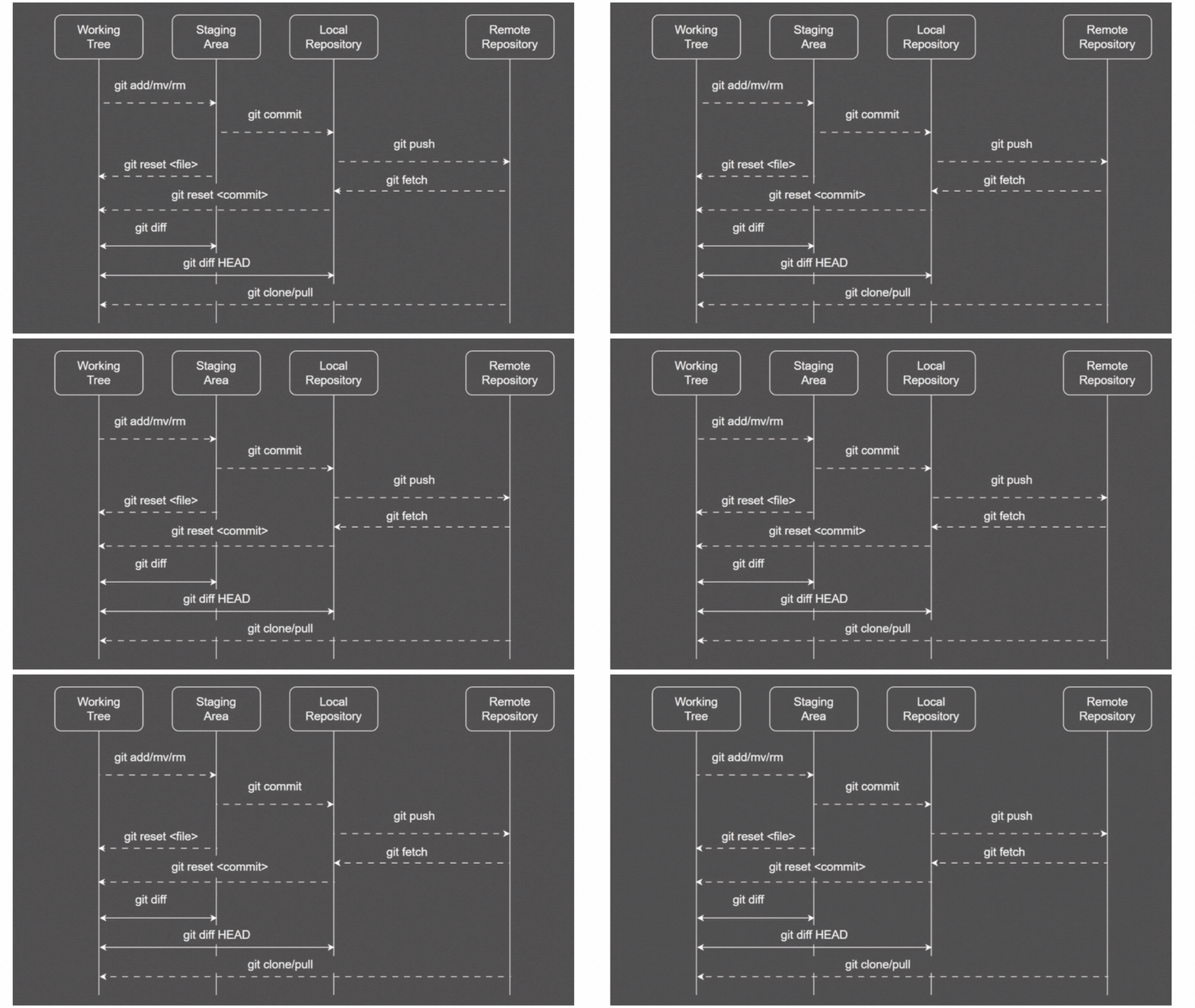
Git thinks of its data more like a series of snapshots of a miniature filesystem. With Git, every time you commit, or save the state of your project, Git basically takes a picture of what all your files look like at that moment and stores a reference to that snapshot. To be efficient, if files have not changed, Git doesn’t store the file again, just a link to the previous identical file it has already stored. Git thinks about its data more like a stream of snapshots.
The three states of Git:
- Modified
- Staged
- Committed
Writing in Progress…